AI Decluttering for Real Estate Photos: Remove Clutter in Seconds
Learn how AI decluttering transforms messy, lived-in property photos into clean, show-ready images. Step-by-step guide with before and after examples.
Clutter is the silent killer of listing photos. A homeowner's personal belongings, stacked mail on the counter, toys scattered across the floor, overstuffed bookshelves. These everyday items make rooms feel smaller, darker, and less appealing to buyers scrolling through listings online. And in a market where 97% of buyers start their search on the internet, your listing photos are doing the selling long before an agent opens the front door.
The good news: AI decluttering technology has made it possible to transform lived-in, messy rooms into clean, show-ready spaces in seconds. No more asking sellers to spend a weekend clearing out their belongings. No more postponing photo shoots because the house is not "ready." In this guide, we will walk through exactly how AI decluttering works, when to use it, and how to get the best results.
Why Clutter Kills Listing Photos
The data on clutter and buyer perception is striking. According to the National Association of Realtors, 82% of buyers' agents say that staging (which includes decluttering) makes it easier for buyers to visualize a property as their future home. Properties that are staged, including digitally decluttered photos, sell 73% faster than non-staged homes.
But the problem runs deeper than statistics. Clutter in listing photos creates several specific psychological barriers for buyers:
- Rooms appear smaller. A bedroom with clothes draped over furniture and items covering every surface reads as cramped, even if the square footage is generous.
- Buyers cannot see the space. When countertops are covered, closets are overflowing, and floors are scattered with belongings, the buyer's eye has nowhere to rest. They cannot evaluate the actual features of the room.
- Personal items create distance. Family photos, religious items, political memorabilia, and personal collections remind the buyer that this is someone else's home, not theirs. Decluttering removes that psychological barrier.
- Clutter signals neglect. Fair or not, buyers associate visual clutter with deferred maintenance. A messy kitchen counter makes them wonder about the state of the plumbing behind the walls.
The first photo a buyer sees of each room sets their expectation. If that photo shows clutter, the buyer has already mentally downgraded the property before reading a single word of the listing description.
Try it free
Transform your first property photo in seconds, no account needed.
What AI Decluttering Actually Does
AI decluttering is not virtual staging. This distinction matters, both for setting expectations and for ethical marketing.
Virtual staging adds furniture and decor to an empty room. It creates elements that do not exist in the physical space.
AI decluttering removes or minimizes personal items, clutter, and visual distractions from a furnished, lived-in room. The furniture stays. The layout stays. The room's character stays. What disappears are the items that make the space feel messy rather than inviting.
Think of it as the digital equivalent of what a professional stager does when they walk into a lived-in home: clear the countertops, remove excess items from shelves, tidy up surfaces, and let the room's actual features shine through.
Modern AI decluttering tools analyze each image to identify items that are likely personal belongings or visual clutter, such as dishes on counters, toiletries on bathroom vanities, shoes by the door, papers on tables, and excess items on shelves. The AI then intelligently removes or reduces these items while preserving the room's structure, furniture, and architectural features.
Ethical Note
AI decluttering should enhance the presentation of a property, not misrepresent it. The goal is to show the space at its best, similar to what a thorough tidying session would achieve. Removing permanent fixtures, hiding damage, or fundamentally altering the room crosses into misrepresentation.
Before and After: 6 Common Declutter Scenarios
Here are the most common scenarios where AI decluttering makes the biggest difference in listing photos.
Kitchen Countertops
Kitchens sell homes, but cluttered countertops are one of the most common problems in listing photos. Appliances, cutting boards, dish racks, mail, fruit bowls, and spice racks crowd the counter space and make even a large kitchen feel cramped.
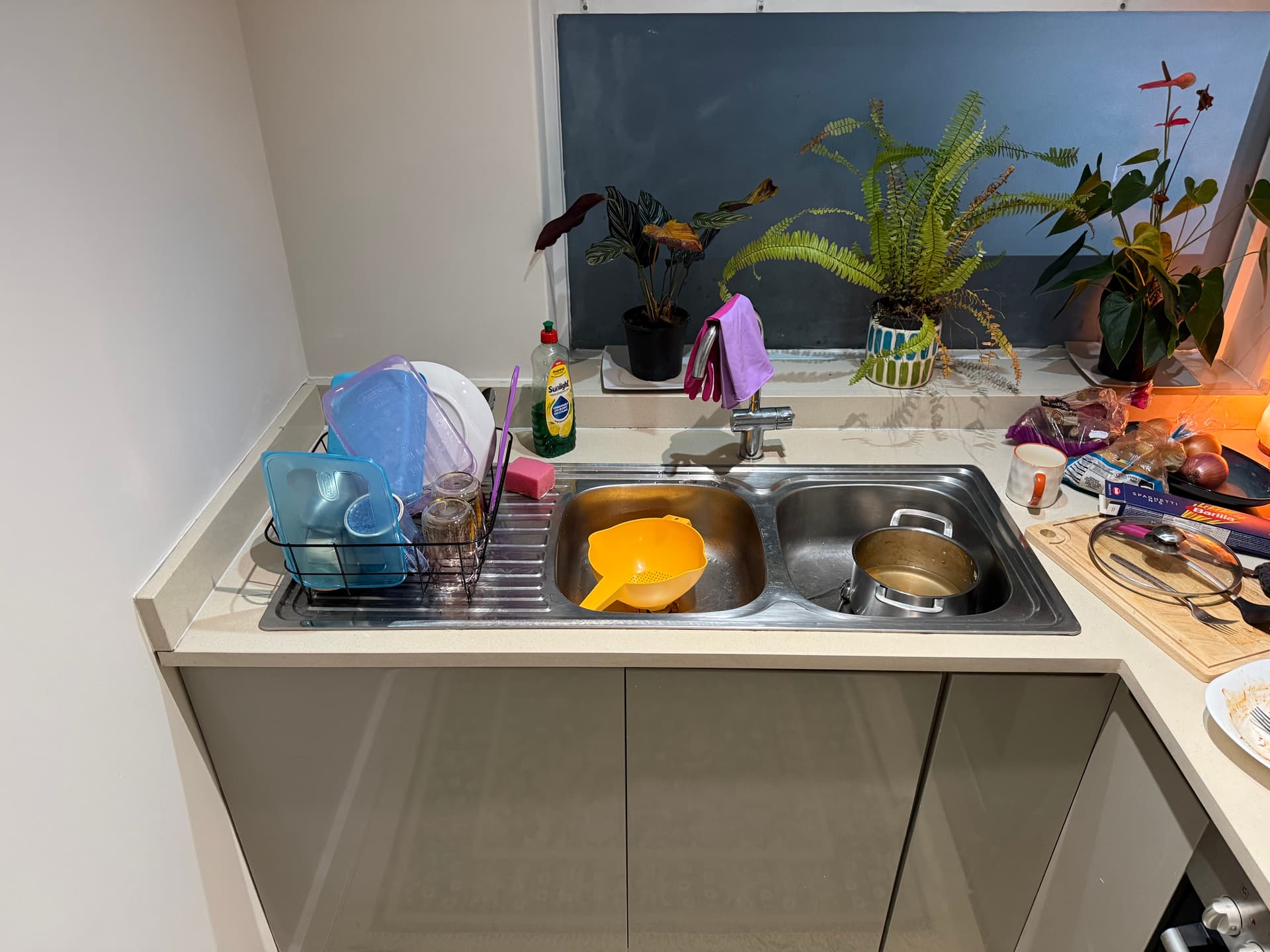
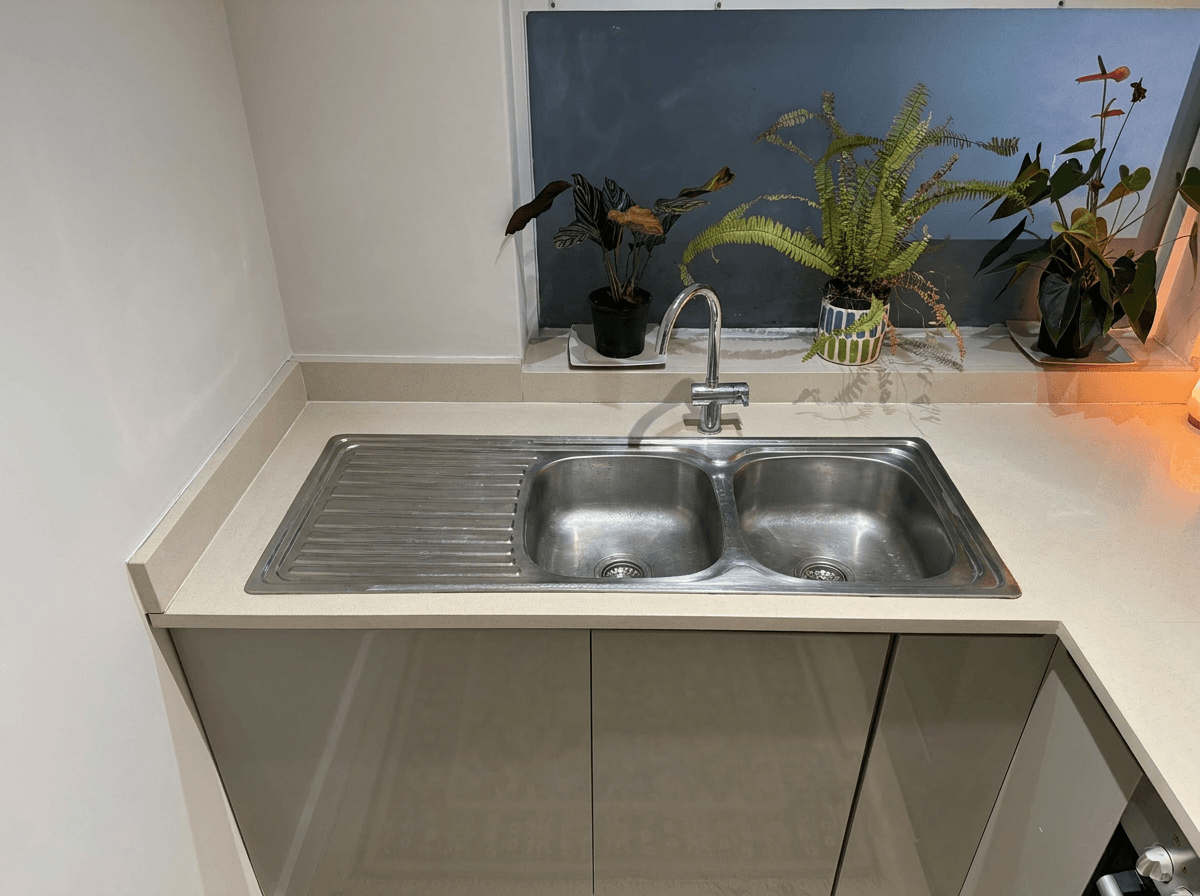 AI Decluttered
Living Room Surfaces
Coffee tables covered in remotes, magazines, and cups. Entertainment centers crowded with photos and knick-knacks. End tables stacked with books. These small accumulations add up to a major visual impact.
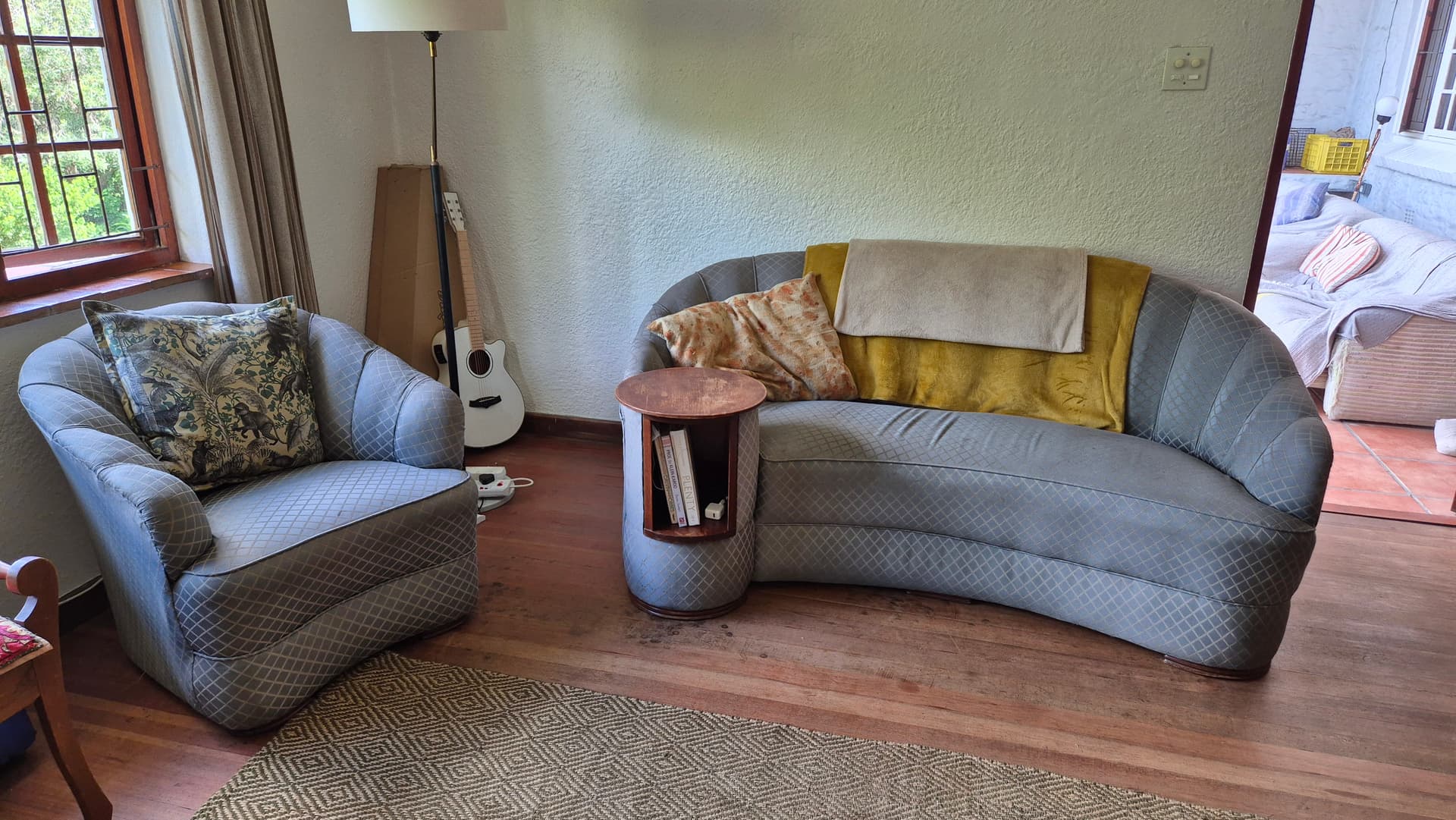
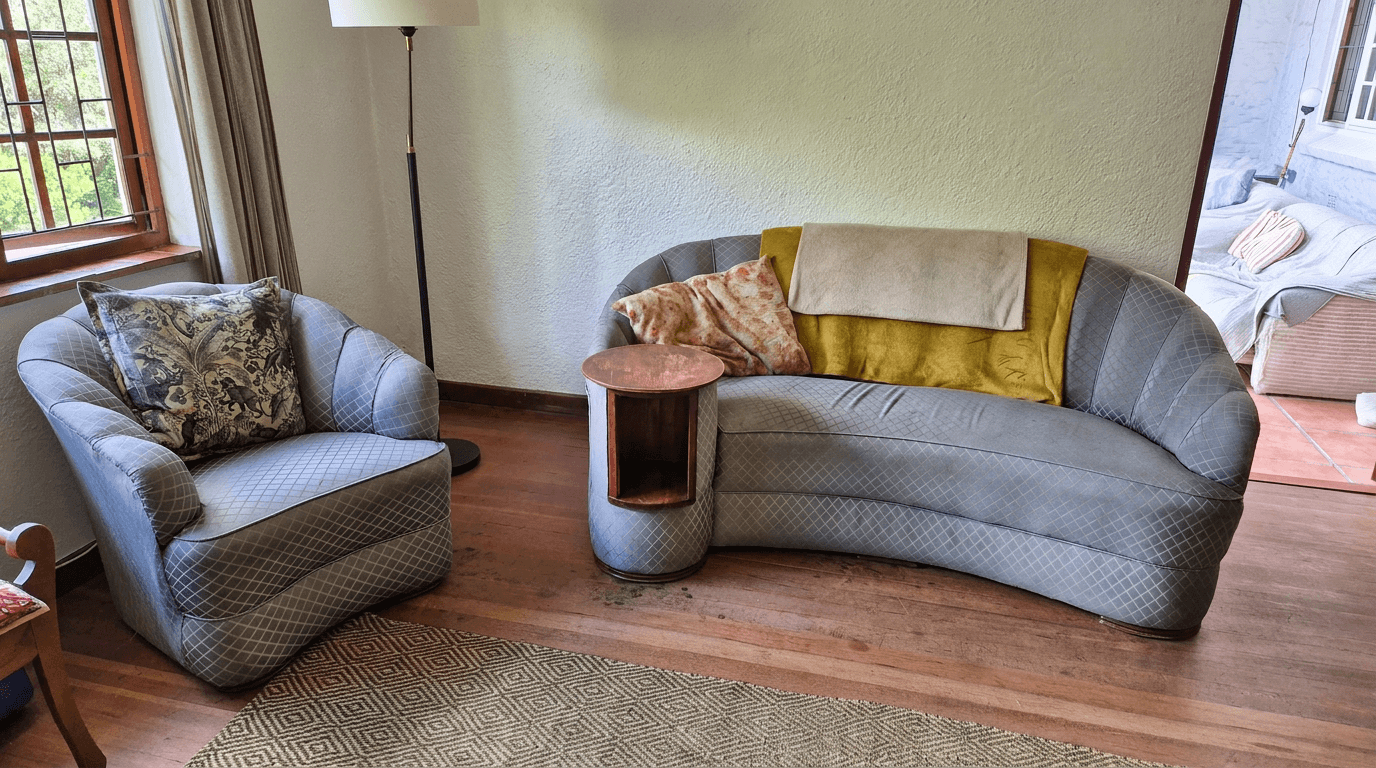 AI Decluttered
Bathroom Vanities
Bathrooms are already small spaces, and cluttered vanities make them feel even smaller. Toiletries, toothbrushes, hair products, and towels draped over fixtures all distract from the actual bathroom features buyers care about.
Bedrooms
Nightstands stacked with books and chargers, dressers covered in personal items, unmade or cluttered beds. Bedrooms are where personal belongings accumulate most visibly.
Home Offices
With remote work now standard, home offices appear in most listings. But a working home office, with monitors, cables, papers, and supplies scattered across the desk, photographs poorly.
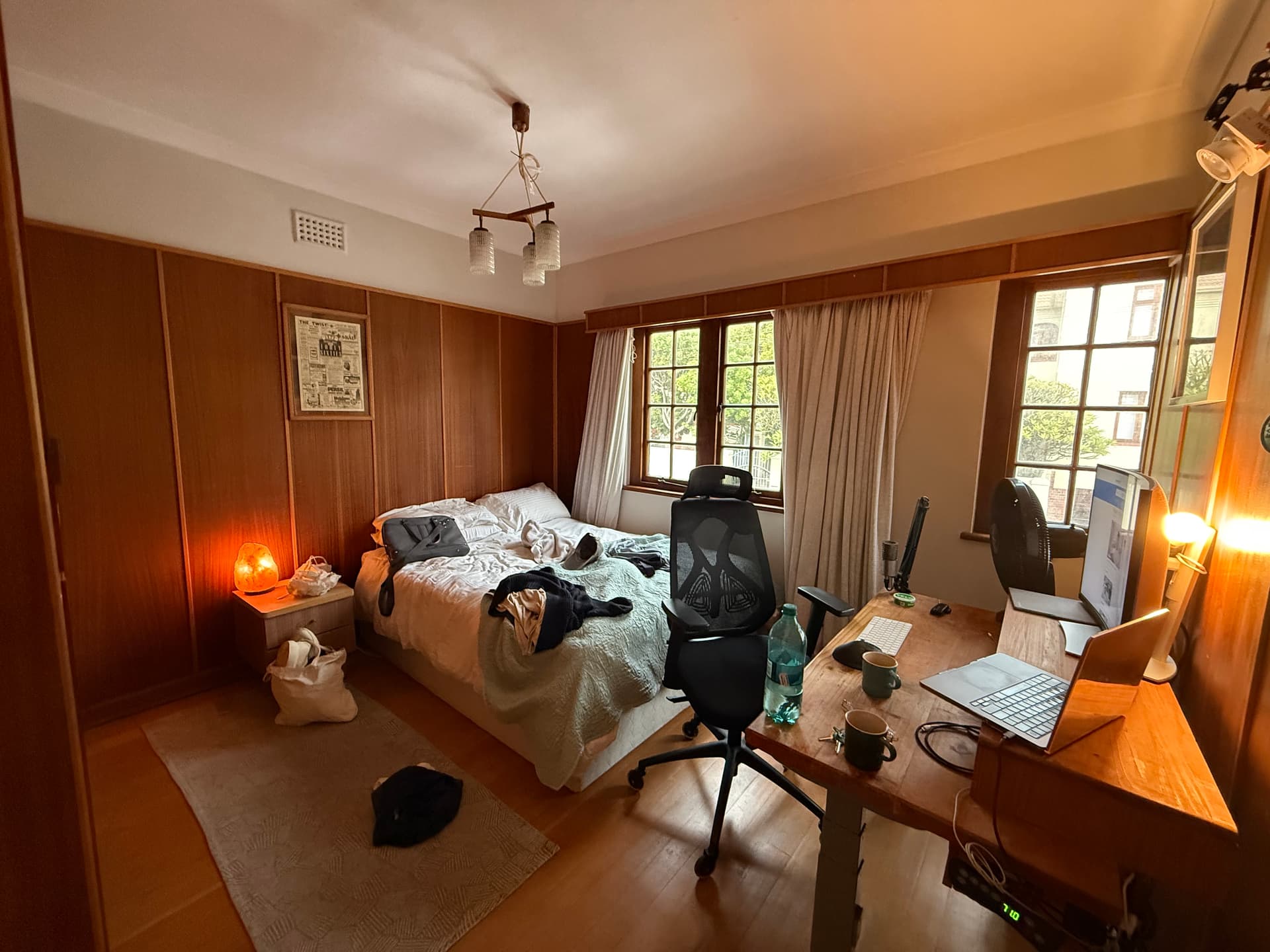
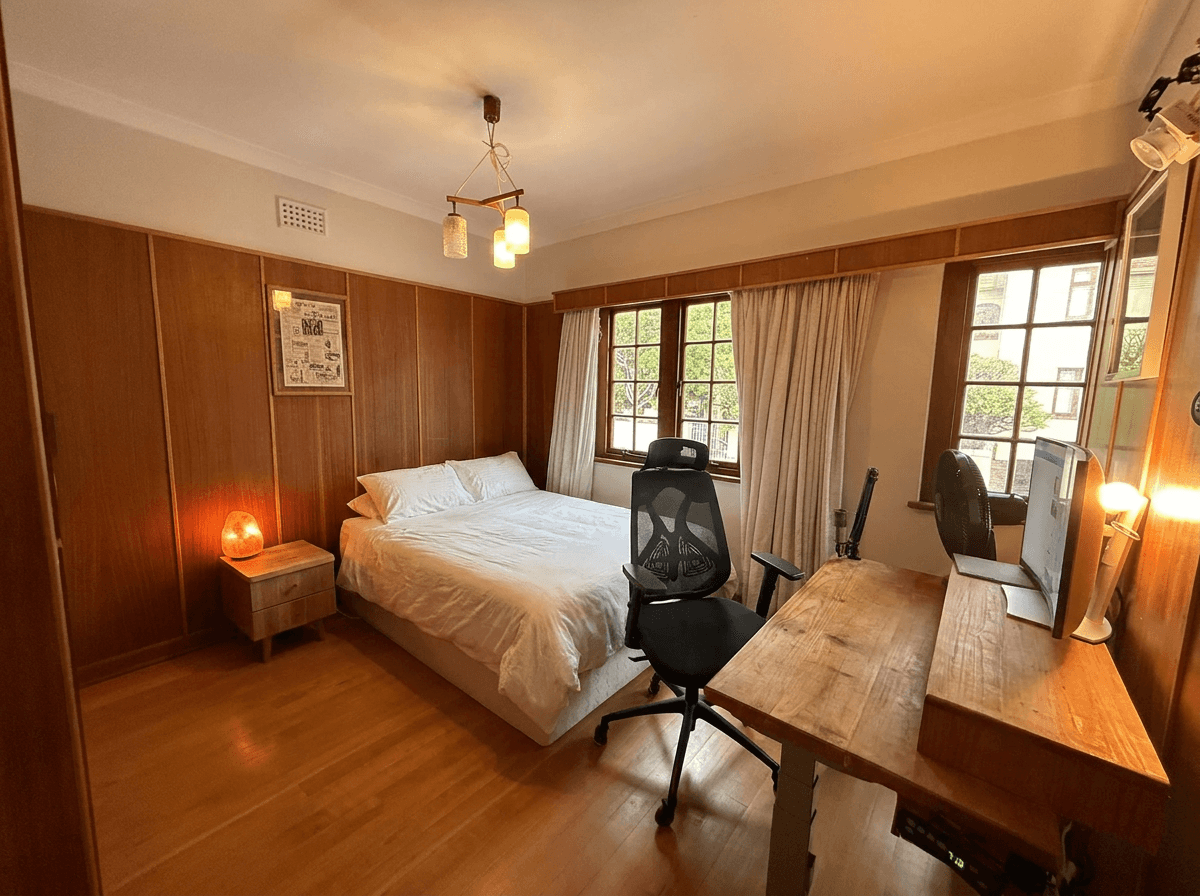 After decluttering
Entryways and Mudrooms
First impressions start at the front door. Shoes, coats, bags, and mail piled in the entryway set a cluttered tone for the entire listing.
Step-by-Step: Decluttering with Twilight
Decluttering your listing photos with AI takes just a few minutes. Here is the process from start to finish.
Step 1: Upload Your Photos
Create a new project in Twilight and upload the photos you want to declutter. You can drag in several photos at once. For the best results, upload at full resolution, since the AI works better with more pixel data.
Step 2: Select the Declutter Preset
Choose the Declutter mode from the editing options. This mode is built to identify and remove common household clutter, and it aims to keep the furniture, architecture and the room's overall character.
Pro Tip
For rooms with heavy clutter, you can combine the Declutter preset with a custom prompt for additional specificity. For example: "Remove clutter from all surfaces and make the space look clean and organized" gives the AI additional context about your intent.
Step 3: Review the Results
Twilight generates your decluttered image in seconds. Use the built-in before/after slider to compare the original with the cleaned-up version. Check that the AI preserved the key features of the room while removing the visual distractions.
Step 4: Refine If Needed
If the initial result needs adjustment, you can refine with a custom prompt. For example, if the AI removed a decorative item you wanted to keep, you can specify "declutter surfaces but keep the vase on the dining table." The iterative process lets you dial in exactly the right level of tidying.
Step 5: Download and Use
Download your decluttered photos at the resolution you need (1K, 2K or 4K) and upload them to the MLS, Zillow, Realtor.com, or wherever you list the property.
Get started free
Create your free account and get 5 credits to start editing.
When to Declutter vs. When to Restage
AI decluttering is powerful, but it is not always the right tool. Here is a decision framework for choosing between decluttering, physical staging, and virtual staging.
Use AI Decluttering When:
- The room is furnished and livable but has too many personal items on surfaces
- The seller cannot or will not clear their belongings for the photo shoot
- You need photos fast and cannot wait for a staging appointment
- The clutter is surface-level: countertops, tables, shelves, vanities
- The furniture and layout are fine but the visual noise is overwhelming
Use Physical Staging When:
- The property is vacant and needs furniture to show scale and function
- The existing furniture is damaged, outdated, or unappealing
- The room layout is confusing and needs furniture to define spaces
- You are selling a luxury property where buyers expect a curated presentation
Use Virtual Staging When:
- The property is completely empty and you need to show it furnished
- Physical staging is too expensive for the price point
- You want to show multiple design options for the same space
For a deeper comparison of virtual staging and photo editing approaches, see our guide on virtual staging vs. photo editing.
Combining Declutter with Other Edits
Decluttering works well when stacked with other Twilight modes. The most useful pairing:
Declutter, then Retouch
Run Declutter first, then Retouch on the decluttered version. Retouch balances exposure, corrects color casts and brightens the room, and it works better on a clean image than a cluttered one.
Workflow Tip
When combining modes, apply declutter first. It is easier for the AI to handle color correction and brightness adjustments on a clean, uncluttered image than the reverse.
Tips for Shooting Declutter-Friendly Photos
Even with AI decluttering available, you will get better results by setting up your shots with decluttering in mind.
Do a Quick Surface Sweep
Before shooting, spend five minutes clearing the most obvious clutter: remove dishes from sinks and counters, close toilet lids, hide trash cans, and pick up items from floors. The less work the AI has to do, the more natural the result looks.
Shoot Wide but Not Too Wide
Ultra-wide-angle lenses capture more of the room but also capture more clutter. A moderate wide angle (around 16-24mm on a full-frame camera or the default smartphone lens) balances showing the room's size with minimizing clutter in the frame.
Mind the Foreground
Clutter in the foreground of a photo is more visually distracting and harder for AI to remove cleanly than clutter in the background. Before each shot, glance at the area closest to your camera and clear it if possible.
Light the Room
Turn on all the lights and open all the blinds. Bright, well-lit rooms make clutter less visually prominent and give the AI more data to work with when processing the image. Dark photos with clutter are the hardest combination to salvage.
Photograph at Chest Height
Shooting from chest height (about 4-5 feet) rather than eye height reduces the amount of surface clutter visible in the frame. This natural angle also makes rooms feel more spacious, which compounds the benefit of decluttering.
The Bottom Line
AI decluttering is one of the highest-impact, lowest-effort edits you can make to listing photos. It bridges the gap between the reality of a lived-in home and the aspirational presentation that sells properties. For agents who have ever delayed a photo shoot because the seller's home was not "ready," or who have lost a listing because the photos looked messy despite a beautiful property underneath, AI decluttering removes that friction entirely.
The technology is fast, affordable, and produces results that rival a professional staging consultation, for a fraction of the cost and in a fraction of the time. Combined with other AI editing tools, it forms the foundation of a modern listing photography workflow that produces consistently clean, professional images.
For more on transforming your listing photos, explore our real estate photo editing before and after gallery and our complete guide to AI photo editing.
View pricing
Credit packs from $12, plans from $29 a month.
Related Articles

Real Estate Photo Editing Costs in 2026: DIY vs. Outsourcing vs. AI
A detailed cost breakdown of editing real estate photos yourself, outsourcing to editors, or using AI tools. Find the most cost-effective approach.

How to Write AI Prompts for Real Estate Photo Editing: A Practical Guide
AI photo editing prompts for real estate that produce reliable edits: templates for day-to-dusk, sky replacement, decluttering, exposure fixes and more.

The Real Estate Agent's No-Nonsense Guide to AI Photo Editing
A plain-English guide to AI photo editing for real estate agents: the five essential edits, the mistakes to avoid, and pro listing photos in 10 minutes.