Lightroom vs AI Editing for Real Estate Photos: A Photographer's Honest Comparison
Lightroom vs AI for real estate photo editing, head to head: speed, quality, learning curve, cost, and when to use each in your workflow.
If you have been editing real estate photos for any length of time, Lightroom is almost certainly part of your workflow. It has been the default editing tool for real estate photographers for over a decade, and for good reason -- its batch processing, preset system, and non-destructive editing make it genuinely excellent for the job.
But AI editing tools have matured to the point where the comparison is no longer theoretical. They are producing results that rival or exceed what most photographers achieve in Lightroom, and they are doing it in seconds instead of minutes. The question is no longer whether AI editing works -- it does -- but whether it works well enough, and in the right ways, to replace or supplement your Lightroom workflow.
This is an honest comparison. Not a marketing exercise where the AI tool wins every category, but a genuine evaluation of where each approach excels, where each falls short, and how experienced real estate photographers are actually integrating both into their work.
Head-to-Head: Five Common Real Estate Edits
Rather than comparing features in the abstract, let us look at how Lightroom and AI editing perform on the five most common real estate photo editing tasks. These are the edits that make up 90% of what real estate photographers do in post-processing.
Edit 1: Exposure and Brightness Correction
The task: A living room shot where the interior is too dark and the windows are blown out. You need even exposure across the entire frame.
Lightroom approach: Pull down Highlights, push up Shadows, adjust Exposure. Use AI masking to select the windows and reduce their exposure separately. Fine-tune with the Tone Curve. Adjust Whites and Blacks for proper range. This takes 2-4 minutes per photo for someone comfortable with the tools, potentially longer if the dynamic range is extreme and requires multiple mask layers.
AI approach: Upload the photo and apply Twilight's Retouch mode. The AI analyzes the scene, identifies the exposure imbalance between interior and exterior, and produces a balanced result. Processing time: about 30 seconds.
Quality comparison: For moderate exposure issues, both produce excellent results. Lightroom gives you granular control to push the exposure exactly where you want it. AI handles the heavy lifting automatically and produces a result that is professional-quality for the vast majority of situations. For extreme cases -- very dark interiors with very bright windows -- Lightroom's manual masking can sometimes recover more detail, but AI results have closed this gap significantly.
Edit 2: White Balance and Color Correction
The task: A kitchen photographed under mixed lighting -- warm tungsten overhead lights, cool daylight from windows, and a slightly green cast from under-cabinet LEDs.
Lightroom approach: Set the white balance by clicking a neutral gray surface. Adjust Temperature and Tint globally. Use color masking to target specific areas with different color casts -- warm-toned ceiling lit by tungsten, cool-toned counters lit by window light. Adjust HSL sliders to refine specific colors (reduce the orange cast on wood cabinets, correct the green on white counters). This takes 3-5 minutes when the mixed lighting is significant.
AI approach: Upload and apply Twilight's Retouch mode. The AI identifies the mixed lighting sources and normalizes the color temperature across the frame. Processing time: about 30 seconds.
Quality comparison: This is one of the areas where AI has made the most impressive gains. Mixed-lighting color correction is genuinely difficult in Lightroom because you are managing multiple zones with different color temperatures. AI models are trained on millions of interior photos and handle mixed lighting remarkably well. For most real estate photography, the AI result is as good as or better than what an average Lightroom user achieves. Expert-level Lightroom users can still extract slightly more nuanced results, but the gap is narrow.
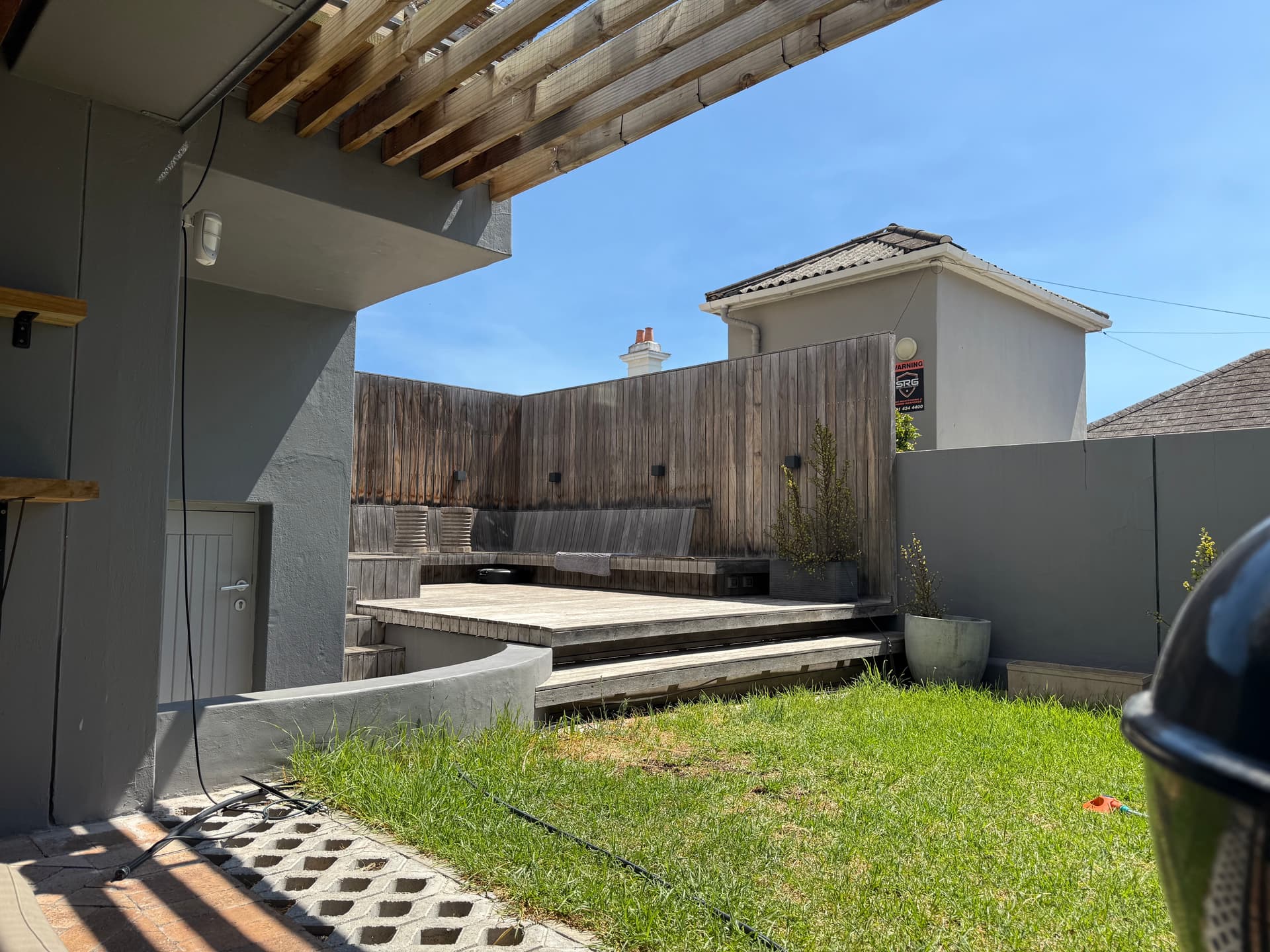
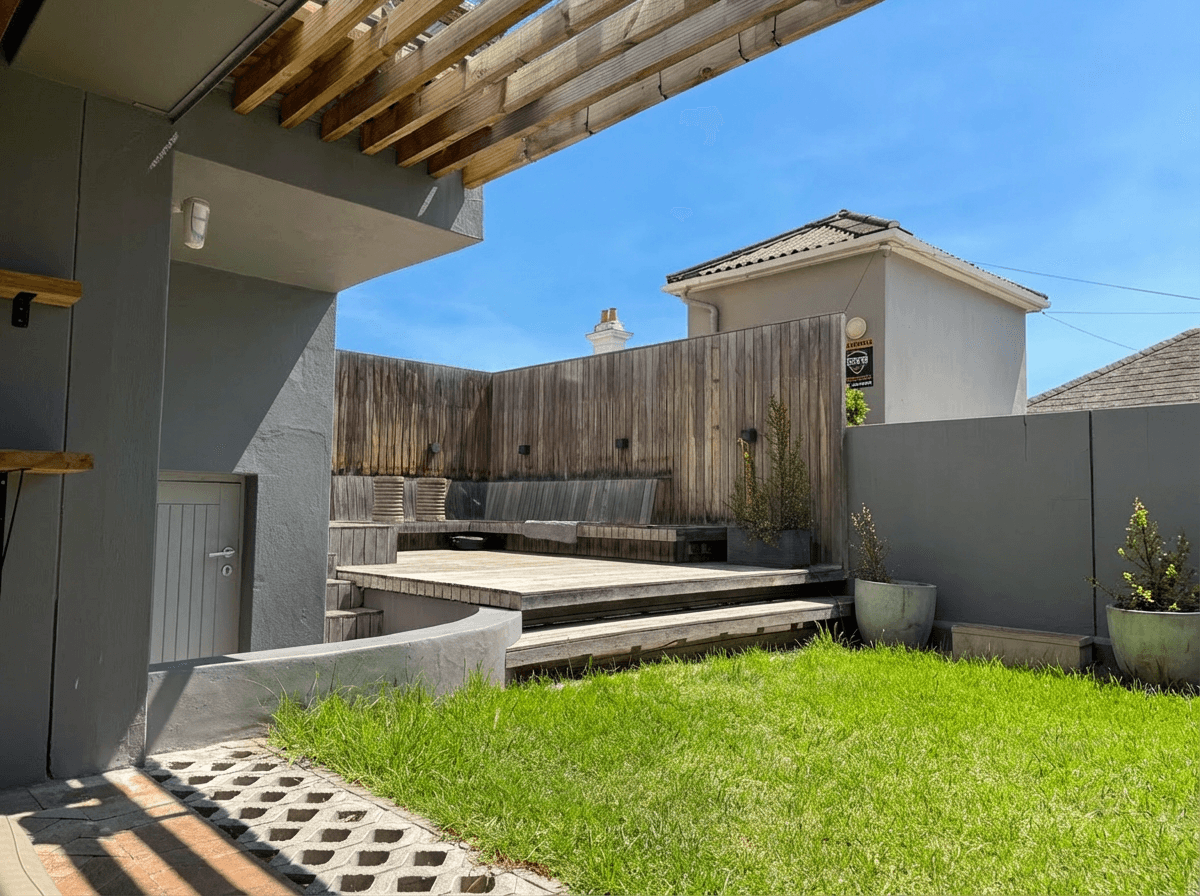 Color Corrected
Edit 3: HDR Processing
The task: Blend a bracket of three to five exposures into a single image with even lighting throughout, visible window views, and natural-looking interior illumination.
Lightroom approach: Merge the bracket to HDR using Lightroom's built-in HDR merge (Photo > Photo Merge > HDR). Then adjust the merged result -- tone mapping, local adjustments for specific areas, shadow and highlight recovery. For complex scenes, export to Photoshop for manual blending with luminosity masks. Total time: 5-10 minutes per final image including the merge and adjustment process.
AI approach: Upload the best single exposure (or the HDR-merged file) and apply Twilight's Retouch mode. If starting from a single exposure, the AI simulates HDR by recovering shadow detail and taming highlights. If starting from a merged HDR file, it refines the tone mapping to look natural. Processing time: about 30 seconds.
Quality comparison: This comparison depends on your starting point. If you are merging brackets in Lightroom, you are starting with more data -- multiple exposures give you genuinely more dynamic range to work with. The Lightroom HDR merge captures detail in both the brightest windows and the darkest corners because those details exist in different exposures. AI working from a single exposure is reconstructing detail that may not be in the file, which is impressive but not always perfect.
However, most real estate photographers report that AI enhancement of a single well-exposed image produces results that are 80-90% as good as a full HDR bracket processed in Lightroom -- at a fraction of the time and without the need to shoot brackets at all. For photographers who do not shoot brackets, AI HDR enhancement is a substantial quality improvement over what they could achieve otherwise. For a deep dive into HDR techniques, see our HDR real estate photography guide.
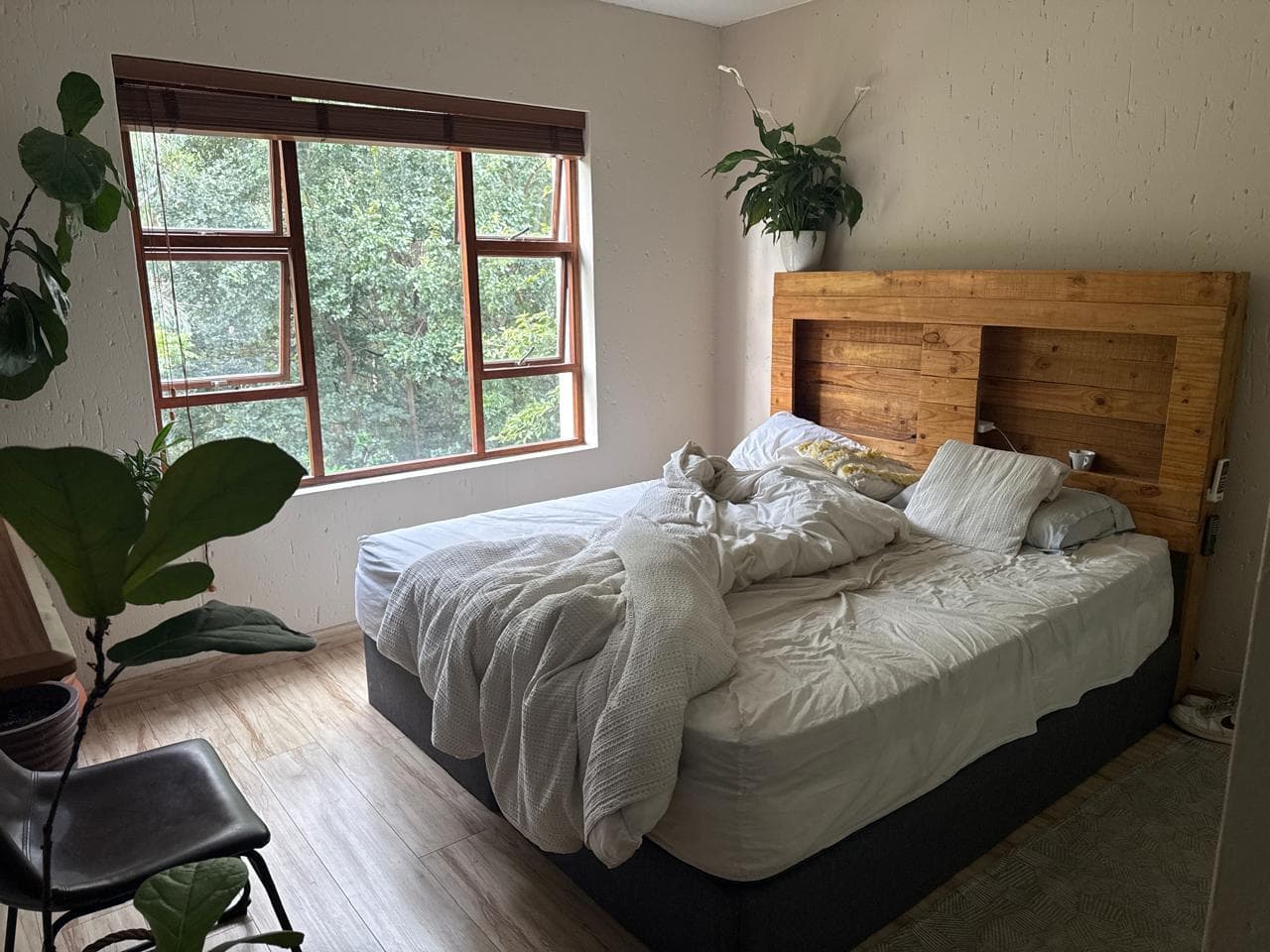
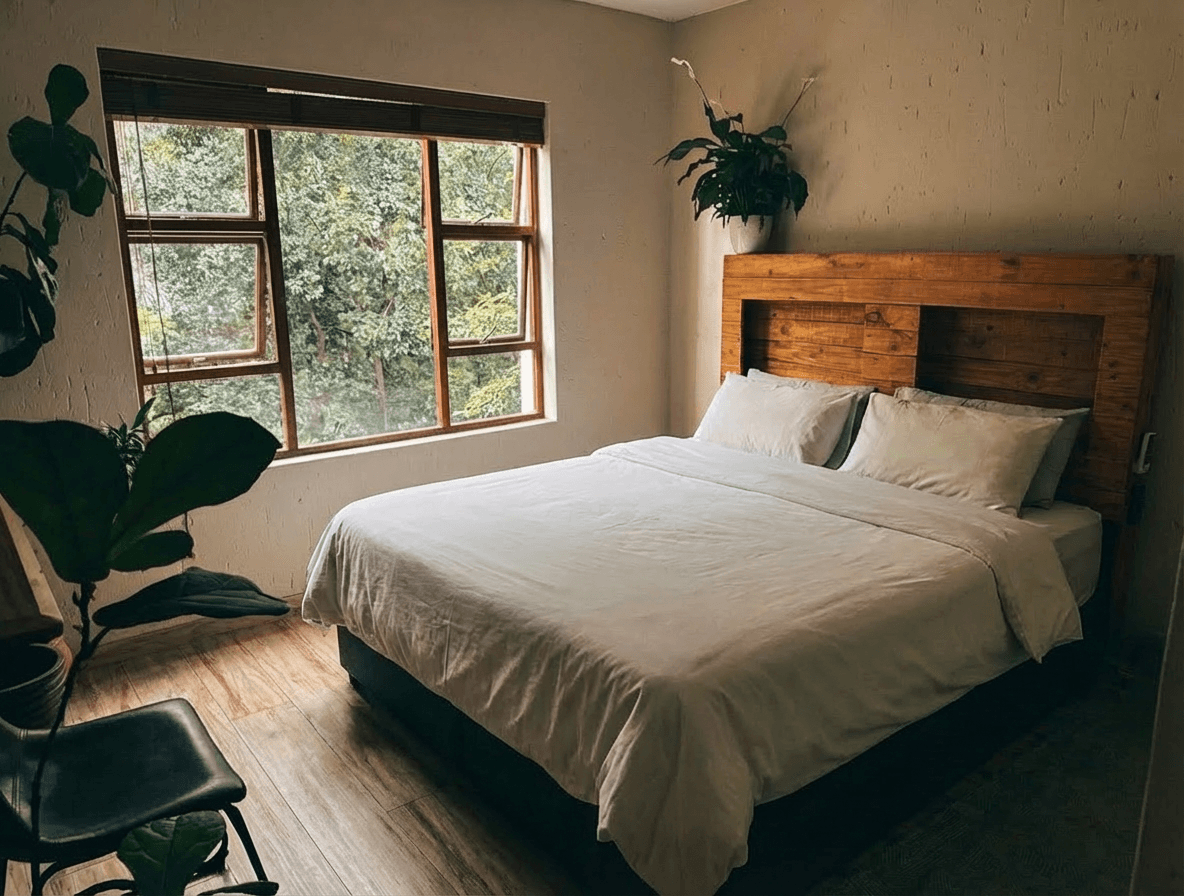 HDR Enhanced
Edit 4: Sky Replacement
The task: Replace an overcast gray sky with a realistic blue sky on an exterior photo.
Lightroom approach: Lightroom does not have a built-in sky replacement feature. You can adjust the sky's exposure and color using AI masking (select the sky, boost saturation, adjust the blue channel), but you cannot replace the sky with a different image. For actual replacement, you need to move to Photoshop, use Select > Sky, and composite in a new sky image. Total time in Photoshop: 10-20 minutes for a clean result with proper edge blending and lighting matching.
AI approach: Upload the photo and select Twilight's Exterior mode. The AI replaces the sky and adjusts the ambient lighting on the ground to match. Processing time: under a minute.
Quality comparison: AI wins this category decisively. Sky replacement is one of the tasks where AI's advantage is overwhelming -- not just in speed but often in quality. The AI handles complex edges (trees, power lines, rooftop details) with remarkable precision and automatically adjusts the ground lighting to match the new sky. In Photoshop, achieving the same natural-looking lighting match requires considerable skill and time. For more on this topic, see our sky replacement guide.
Edit 5: Twilight Conversion
The task: Convert a daytime exterior photo into a twilight (dusk) shot with warm interior lights glowing and a dramatic sky.
Lightroom approach: This cannot be done in Lightroom. It is a complex compositing task that requires Photoshop: darkening the exterior, adding a sunset sky, painting in warm light through windows, adding landscape lighting effects, and balancing the overall color temperature. Even for a skilled Photoshop user, this takes 20-45 minutes per image.
AI approach: Upload the daytime photo and apply the Twilight mode. The AI transforms the scene -- darkening the sky, adding warm interior glow through windows, adjusting the ambient lighting, and creating a realistic dusk atmosphere. Processing time: about 30 seconds.
Quality comparison: This is where AI has had perhaps its most dramatic impact on real estate photography. A twilight conversion that previously required elite Photoshop skills and thirty minutes of work now happens in seconds. The AI results are not perfect in every case -- sometimes the window glow looks slightly off, or the sky gradient could be more natural -- but they are consistently good enough for listing use and often indistinguishable from professionally composited twilight shots. For most photographers, AI twilight conversion has eliminated the need to either shoot at dusk or spend significant time in Photoshop.
Time Benchmarks: The Numbers
Time is money in real estate photography. Here is how the two approaches compare across a typical 25-photo listing with five exterior shots and twenty interiors.
| Task | Lightroom (per photo) | AI Editing (per photo) | Lightroom (full listing) | AI Editing (full listing) |
|---|---|---|---|---|
| Import and cull | 10-15 min | 5-10 min | 10-15 min | 5-10 min |
| Exposure correction | 2-4 min | <0.5 min | 40-80 min | <10 min |
| White balance | 1-3 min | <0.5 min | 20-60 min | <10 min |
| HDR merge and adjust | 5-10 min | <0.5 min | 25-50 min | <3 min |
| Sky replacement | 10-20 min (Photoshop) | <1 min | 50-100 min | <5 min |
| Twilight conversion | 20-45 min (Photoshop) | <0.5 min | 20-45 min (1 image) | <1 min |
| Export | 5-10 min | 2-5 min | 5-10 min | 2-5 min |
| Total | 2.5-6 hours | 25-45 minutes |
These are realistic benchmarks based on a photographer with intermediate Lightroom skills. An expert can be faster in Lightroom; a beginner will be slower. The AI times are consistent regardless of skill level because there is no manual adjustment involved.
The time differential is significant: a listing that takes three to four hours in Lightroom takes thirty minutes with AI editing. Over the course of a year shooting two to three listings per week, that is 300-500 hours saved -- roughly 40-60 full working days.
Quality Comparison by Skill Level
One of the most important factors in this comparison is who is doing the editing. Lightroom results vary enormously by skill level. AI results are consistent.
Beginner (Less Than 1 Year of Lightroom Experience)
A beginning Lightroom user typically over-edits or under-edits. They push exposure too far, create unnatural HDR looks, apply white balance corrections that introduce new color casts, and struggle with local adjustments. Their results are visibly amateur.
AI advantage: Massive. A beginner using AI editing produces results that are dramatically better than what they would achieve in Lightroom. The quality gap is not subtle -- it is the difference between amateur and professional presentation.
Intermediate (1-3 Years)
An intermediate Lightroom user has developed a feel for the tools and can produce clean, professional results on straightforward images. They may struggle with mixed lighting, extreme dynamic range, and complex local adjustments. Their editing is good but inconsistent -- some images in a set look great while others look slightly off.
AI advantage: Significant. The AI produces more consistent results across an entire listing and handles challenging images (mixed lighting, extreme exposure) better than most intermediate users. The time savings alone make AI compelling at this level.
Expert (3+ Years, Daily Use)
An expert Lightroom user can produce exceptional results that match or occasionally exceed AI output. They have developed custom presets, understand color science, and can handle any image thrown at them. Their work is consistently excellent.
AI advantage: Speed, primarily. The quality gap narrows substantially at this level. An expert's Lightroom edits may be slightly more refined on individual images, but the AI results are so close that the difference is imperceptible to buyers. The value proposition shifts from quality to efficiency -- do you want to spend three hours on what AI does in thirty minutes for a result that 99% of viewers cannot distinguish?
The Honest Truth About the Hybrid Approach
Most expert photographers who have adopted AI editing did not abandon Lightroom entirely. They use AI for the bulk of their editing -- the 90% of images that need standard enhancement -- and reserve Lightroom for the 10% where they want fine-grained control over a specific creative vision. This hybrid approach delivers the best of both worlds: AI speed for most images and manual precision for the select few that warrant it.
Learning Curve
Lightroom
Lightroom's learning curve is moderate but real. A new user can produce acceptable results within a few weeks of regular use, but developing the skill to consistently produce professional real estate edits takes three to six months of dedicated practice. Mastering local adjustments, color grading, and complex masking takes longer.
The learning investment includes:
- Understanding the Develop module's tools and how they interact
- Learning to read histograms and evaluate exposure
- Developing presets for common scenarios
- Mastering the AI masking tools for selective adjustments
- Understanding color theory enough to handle mixed lighting
- Learning the catalog system for efficient asset management
AI Editing
The learning curve for AI editing is minimal. The core workflow is: upload, select preset, download. Meaningful proficiency is achieved in the first session. The learning that does occur is about understanding which preset to apply in which situation and how to evaluate whether the AI result meets your standards.
For photographers transitioning from Lightroom, the harder "learning" is actually unlearning -- accepting that the tool handles decisions you used to make manually and trusting the output without needing to tweak every slider.
Subscription Costs
Lightroom
- Lightroom alone: $9.99/month (includes 1TB cloud storage)
- Photography Plan (Lightroom + Photoshop): $22.99/month
- Annual cost: $120-276
You need Photoshop in addition to Lightroom for sky replacement and twilight conversion, so the realistic cost is the Photography Plan at $22.99/month or $276/year.
AI Editing (Twilight)
- Free tier: 5 credits when you create an account, to try the platform (they do not refill monthly)
- Starter: $29/month (50 credits)
- Pro: $79/month (200 credits)
- Agency: $199/month (600 credits)
- Credit packs: $12 to $140 for 10 to 150 credits, no plan needed
- Annual cost on a plan: $348-2,388 depending on volume
1 credit is one edit at 1K; 2K costs 2, 4K costs 4.
Twilight prices as of October 2026. See pricing for current prices.
At first glance, AI editing appears more expensive. But this comparison misses a critical factor: your time. If Lightroom editing takes three hours per listing and AI takes thirty minutes, the time saved has a direct dollar value. A photographer billing $150/hour who saves 2.5 hours per listing saves $375 in opportunity cost per listing. Over 100 listings per year, that is $37,500 in time value against a maximum AI editing cost of $2,388.
Even if you value your time at $50/hour, the math favors AI editing once you process more than about two listings per month. For a broader comparison of editing tools and their costs, see our complete software comparison.
What You Gain by Switching to AI
Speed
This is the primary and most obvious gain. Editing that took hours takes minutes. The time reclaimed can be spent shooting more listings, marketing your business, or simply having a better work-life balance. For high-volume photographers, the speed advantage is transformative.
Consistency
Every image processed through the same AI preset receives the same treatment. There is no variation caused by fatigue, mood, or the subtle differences in how you edit on a Monday morning versus a Friday afternoon. Across a thirty-photo listing, every room has the same brightness, the same color temperature, and the same overall feel. This consistency is difficult to achieve manually, even for disciplined editors.
Accessibility
AI editing removes the skill barrier. An agent who has never opened Lightroom can produce professional-quality listing photos. A photographer's assistant can handle editing that previously required the photographer's expertise. This is not about replacing skill -- it is about making professional results available to more people.
Scalability
When you land a new client who wants five listings shot and edited per week, AI editing scales to meet the demand without requiring additional editing staff or longer hours. Your capacity is limited by shooting time, not editing time.
What You Lose by Switching to AI
Granular Control
In Lightroom, you control every parameter. You decide exactly how bright the shadows are, precisely what color temperature the kitchen has, and specifically how much detail to recover in the window highlights. With AI, you accept the model's decisions. You can choose between presets, but you cannot adjust individual parameters within the AI's output.
For most real estate photography, this trade-off is acceptable because the AI's decisions are good. But for photographers who have a specific creative vision or who want their work to have a distinctive signature style, the loss of granular control is meaningful.
The Editing Process
Some photographers genuinely enjoy editing. The meditative focus of working through a set of images, making careful adjustments, and seeing each photo transform under their hands is a satisfying part of the craft. AI editing eliminates this process entirely -- you upload, click, and download. If editing is something you value for its own sake, not just for its output, AI removes an activity you enjoy.
Understanding Your Images
Manually editing forces you to closely examine every image. You notice composition issues, identify problems with your shooting technique, and develop a deeper understanding of light and color. This feedback loop makes you a better photographer over time. AI editing short-circuits this loop -- you may not notice what was wrong with the original because the AI fixed it before you looked closely.
Edge Cases
AI handles most standard listing photos well. Unusual compositions, extremely challenging lighting, or creative shots that do not fit standard real estate patterns may produce results that are good but not quite right. In Lightroom, you can finesse these edge cases. With AI alone, your options are to try a different mode or accept the result as-is.
Try it free
Transform your first property photo in seconds, no account needed.
The Hybrid Workflow: When to Use Each
The most effective approach for most real estate photographers is not choosing one or the other but using each where it excels.
Use AI Editing For:
- Standard interior enhancements. Brightness, color correction, and HDR for typical room photos. This is the bulk of real estate editing and where AI delivers the most time savings.
- Sky replacement. AI sky replacement is faster and often better than manual replacement in Photoshop.
- Twilight conversions. Unless you have elite Photoshop compositing skills, AI twilight conversion produces better results in a fraction of the time.
- Batch processing large listings. When you have thirty or more photos to edit, AI consistency across the batch is a significant advantage.
- Fast turnaround jobs. When the agent needs photos by end of day, AI editing makes same-day delivery trivial.
Use Lightroom For:
- RAW file development. If you shoot in RAW (and you should), Lightroom's RAW development engine gives you the best starting point before AI enhancement.
- Creative or portfolio shots. For images that will represent your brand or portfolio -- your website hero images, competition entries, or social media showcase posts -- manual editing lets you express your creative vision.
- Problematic images. The 5% of images where AI results are not quite right. Open them in Lightroom, make targeted adjustments, and move on.
- Learning and development. If you are still building your photography skills, regular Lightroom editing provides valuable feedback on your shooting technique.
A Practical Hybrid Workflow
- Import to Lightroom. Cull your images -- remove duplicates, out-of-focus shots, and unnecessary angles. This is still fastest in Lightroom's Library module.
- Basic RAW development in Lightroom. If shooting RAW, apply lens corrections, straighten verticals, and crop. These geometric adjustments are better done before AI processing.
- Export JPEGs for AI editing. Export your culled, corrected images as high-quality JPEGs.
- Batch process through AI. Apply your chosen preset to the entire batch. Download the results.
- Review and refine. Scan the AI results. For the photos that look right, move to export. For the few that need adjustment, open them in Lightroom for targeted corrections.
- Final export and delivery. Export from Lightroom at the specifications required by the MLS or client.
This workflow takes 45-60 minutes per listing -- longer than AI-only but far shorter than Lightroom-only -- and produces the highest possible quality by leveraging each tool's strengths.
The Honest Recommendation
If you are a beginner or intermediate photographer editing real estate photos, AI editing is the clear choice. You will produce better results, faster, with less frustration than learning to master Lightroom. The quality advantage of AI over a developing Lightroom user is substantial and immediate.
If you are an expert Lightroom user, the calculation is about time versus control. If speed and scalability matter -- and for most working photographers they do -- adopting AI for the bulk of your editing while reserving Lightroom for select images is the optimal approach. You will not sacrifice quality that buyers notice, and you will reclaim hours every week.
If you are an agent who edits your own photos, AI editing is transformative. You should not be spending time learning Lightroom when a tool built specifically for real estate photography can produce professional results with zero skill required. Your time is better spent on what you do best -- selling properties.
The photography industry has reached a genuine inflection point. AI editing is not a gimmick or a shortcut -- it is a fundamentally better approach for the specific, well-defined task of real estate photo enhancement. The photographers who recognize this early are gaining a meaningful competitive advantage in both quality and efficiency.
For a hands-on look at how AI editing works in practice, see our guide to editing real estate photos with AI. And for those interested in how AI handles specific tasks like color correction in detail, our color correction guide breaks down the technical side.
Get started free
Create your free account and get 5 credits to start editing.
Related Articles
AI Image Models Compared for Real Estate: Nano Banana, Flux, SDXL, DALL-E 3, and Imagen
AI image models for real estate photo editing, compared: Nano Banana, Flux, SDXL, DALL-E 3 and Imagen 3, tested on the edits agents actually need.
Outsourcing Real Estate Photo Editing vs AI: Which Saves You More in 2026?
Outsourcing real estate photo editing vs AI: a cost and quality comparison of human editors and AI tools, with monthly cost tables and scenarios.
Airbnb Photography vs Real Estate Photography: Key Differences That Matter
Airbnb vs real estate photography: how shooting style, staging, editing and photo order differ, and how to optimize for each market.